About Me

My photo
SEMARANG, JAWA TENGAH, Indonesia
Write about blogging tips, blog Promotion tips and tips Indonesian-language blog monetization through business programs online through Blogging (dot) Com Entire contents are the views and experiences Blogging (dot) Com personal. You can get the latest updates and tips on the best of Blogging (dot) Com free via RSS or email.

Pages

Showing posts with label Tools. Show all posts

Monday, June 14, 2010

How to analyse Pagerank of a web site?


How do you know which website is which have link to your site which assumed by google of vital importance? You can determine how important a website with two way of, that is:


Google Toolbar ( http://toolbar.google.com) which is installed in a web browser, can present Google Pagerank (with calculation 1 till 10) to each its indexed page.If your web get link from web owning Pagerank 10, Your web would be assumed nicer compared to if getting link of web owning pagerank 2.

Alexa Toolbar (www.alexa.com) will integrated in web browser after installed.This way also present "average traffic rank" pursuant to to the number of web site visited by all consumer of Alexa Toolbar users.

Crystal clear, link coming from web site owning position more above will jack up your web compared to link coming from website which under page result of searching.

Google Ad Manager for Adsense to Increase Revenue

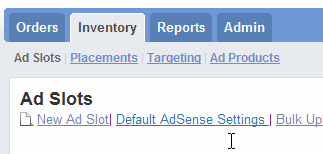
Google Ad Manager is a free, useful tool to manage your ads placement effectively and maximizing the revenue from your website. It has intuitive user interface, automated yield optimization, and proven speed and reliability.


You can control what types of ads to be display in a section such as you can display Adsense and your own ads on the same spot. It will filter the based on the criteria and inventory type you have set in Google Ad Manager account so that you can save more time on your ad management solution and give more time to focus on advertisers.
Ad Manager helps publishers maximize their inventory sell-through rates. Don’t worry about the complication of the account setup process as Google provide a simple tutorial with step by step instructions. You can either choose to follow the tutorial or simply close it.

Google Ad Manager is best for website owner who have a lot of banners and ad spots from advertisers selling at your website. You will have complete control of the ads placement and configurations. There are three types of Reports available for you

Delivery Reports – View performance of orders and ad networks
Inventory Reports – Monitor ad slot and placement performance
Sales Reports – Keep track of sales performance

Although, Google Ad Manager still in Beta stage and there could be more improvements to be added. Let see what it do more for Website Ad Management in the future.

Sunday, June 13, 2010

All-In-One Messenger Tools

Digsby is a multiprotocol IM client that lets you chat with all your friends on AIM, MSN, Yahoo, ICQ, Google Talk, Facebook Chat and Jabber with a simple to manage buddy list. It supports multiple conversations with tabbed conversation windows. If one of your friends has more than one IM account you can combine them into a single merged contact to eliminate duplicate buddies.


You can change Facebook status easier using Digsby. What you need to do is just enter the status message and send it over to Facebook. You can view friends’ feed and updated status via Digsby also which make it an alternative tool for easier chatting and keep in touch with friends.

Either than Instant Messenger feature, it has email managing feature too. You can manage Hotmail, Gmail, Yahoo Mail, AOL/AIM Mail, IMAP, and POP accounts right from digsby. Send emails to your friends right from the IM window. The email is sent directly from any account digsby is tracking for you.

Download here